

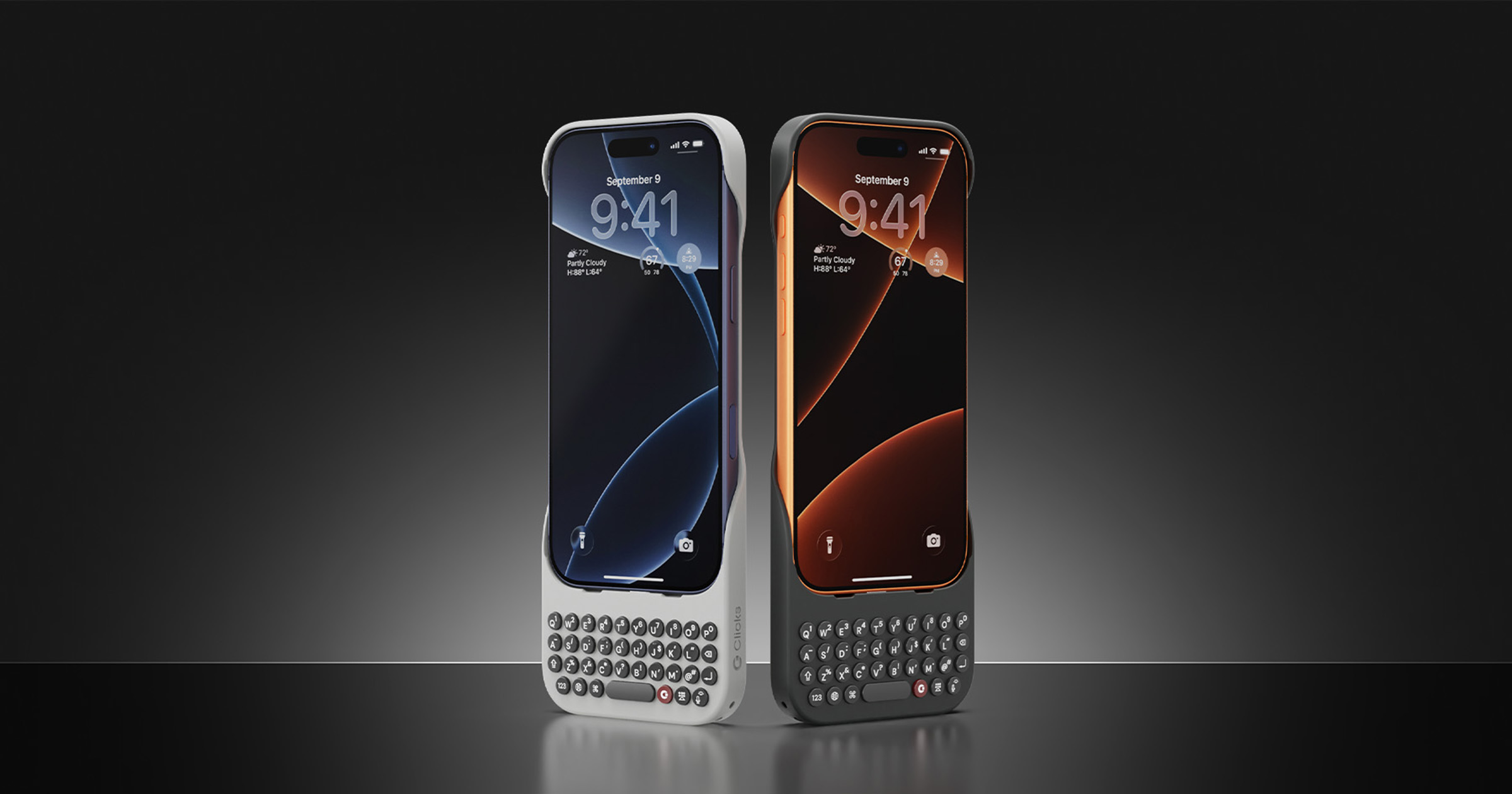
Clicks Keyboard for iPhone 17: the physical keyboard case, slimmer and clip-on
A case that adds a real backlit keyboard below the iPhone 17: connected by USB-C, with no battery or Bluetooth, it clips on and frees up, according to the brand, the half of the screen the on-screen keyboard took.

What it is
The Clicks Keyboard for iPhone 17 is a case that adds a physical keyboard to the iPhone, placed below the screen, in the spirit of the keyboard phones of the past. The iPhone slots into the case and connects to the keyboard through its USB-C port: the round, backlit keys send their keystrokes straight to the phone. The brand, Clicks Technology, offers it for the iPhone 17, 17 Pro and 17 Pro Max, in two colours, Onyx and Smoke.
According to the brand, this generation is 40% thinner and 11% lighter than the one for the iPhone 16. Its curved shape is made, it says, to be easy to hold, and it lets the natural colour of the iPhone show through. Older models do not fit this case: the iPhone 17 case does not suit earlier iPhones.

Why it exists
Clicks starts from an observation that the brand puts this way: the on-screen keyboard takes the place of what you are reading. By moving it off the screen, it claims to give the user 50% more usable space. The product is aimed at those who miss typing on keys, and the brand cites customers coming from BlackBerry as testimonials.
The idea comes with a second selling point: a case that protects. According to the brand, the whole combines protection for the iPhone against drops with the convenience of buttons, in a single piece.

What matters
The connection. The keyboard connects to the iPhone’s USB-C port. It contains no battery and draws a little power from the phone: according to the brand, up to 2% of battery per hour of heavy use with the backlight off, and up to 2% more with the backlight on. A power-saving mode cuts the link after a period of inactivity. There is nothing to pair: the keyboard works as soon as the iPhone is inserted.
The clip-on fit. The new case goes on and comes off more quickly than the previous one, thanks to a clip-on design. The brand states that it has been put through more than 2,000 installations and removals.
Charging and MagSafe. The case keeps a USB-C port for charging and data, and MagSafe is built in, according to the brand: wireless chargers, car mounts and magnetic accessories can be used without taking the case off.
The keys. The keys of this generation are sculpted for typing, and backlit. The optional Clicks app adjusts the brightness of the backlight, how long it stays on, and the shortcuts that launch apps.
Day to day
With the iPhone in the case, iOS keyboard shortcuts work: the brand cites Command + Space to launch search, Command + H to return to the home screen and, in Messages, Command + N to write a new message. A long press on the microphone key activates Siri, and pressing any key wakes the screen.
The on-screen keyboard stays within reach: a dedicated key shows or hides it. It is for entering a character that is not on the keys, or for typing quietly during a call, since the typing is audible to the person on the other end, the brand points out.
AppleInsider’s review, published in September 2024 and devoted to an earlier generation, describes an object that adds bulk: the iPhone looks longer and sticks out of a back pocket. Its author sees a tool that encourages you to slow down and think, rather than a gain in speed. These remarks do not concern the iPhone 17 model.

To carry the whole thing, the brand lists a strap, sold separately, that attaches to the case’s two attachment points: on the wrist or across the body, the phone stays within reach while you type. The brand also states that the case cannot be used with another case, that a screen protector film remains possible, and that the keyboard is not waterproof: it must be taken off in damp conditions.

Technical specifications
| Feature | Value |
|---|---|
| Compatible models | iPhone 17, iPhone 17 Pro, iPhone 17 Pro Max |
| Interchangeability | iPhone 17 and 17 Pro: same case; 17 Pro Max: its own case |
| Connection | Direct USB-C, no Bluetooth |
| Battery | None; power drawn from the iPhone |
| iPhone charging | Case USB-C port (charging and data); MagSafe built in |
| Backlight | Yes, adjustable in the app |
| Thinness and weight | 40% thinner and 11% lighter than the iPhone 16 version (according to the brand) |
| Strap attachment | Two attachment points |
| Colours | Onyx, Smoke |
| App | Clicks, optional (iOS and Android), settings and updates |
What the brand says
Clicks presents this generation as its most accomplished and most refined keyboard: slimmer, lighter, clip-on, with a patent-pending design. It announces a “premium” typing feel, ergonomic keys for speed and precision, and two attachment points for a strap, a wrist loop or a cross-body sling. The brand also states that it has sold more than 200,000 keyboards in more than 100 countries, across all models.
For readers in Switzerland
The brand’s shop lists Switzerland in its country selector, and shows its prices there in euros. Its interface is in English.
Why it caught our eye
We spotted it for its stubborn idea: giving the iPhone back keys that press down, with no Bluetooth and no battery to recharge. We like the design of this generation, slimmer and lighter than the previous one, and the backlit keyboard with round keys that recall the keyboard phones of the past.
Exactly the kind of brand we’d love to come across on O!deal one day.
SourcesClicks, page produit iPhone 17 (new tab) · Clicks, questions fréquentes (new tab) · AppleInsider (new tab) · MacRumors (new tab)
Frequently asked questions
- Which iPhones does the Clicks Keyboard for iPhone 17 accept?
- The iPhone 17, 17 Pro and 17 Pro Max, and only those. According to the brand, the iPhone 17 version and the iPhone 17 Pro version are interchangeable, whereas the Pro Max version only fits the iPhone 17 Pro Max.
- Does it need pairing over Bluetooth or recharging?
- No. The keyboard connects directly to the iPhone's USB-C port, with no battery: it draws a little power from the phone, and works as soon as the iPhone is inserted. The optional Clicks app is for settings.
- Can you still charge the iPhone and use MagSafe?
- Yes. The case keeps a USB-C port for charging and data transfer, and the brand states that MagSafe is built in, for wireless chargers, car mounts and magnetic accessories.
- Can you still use the on-screen keyboard?
- Yes, the display key shows and hides the on-screen keyboard, for example for characters the physical keyboard does not carry, or to type quietly.
Also worth reading
- O!radarCamp Snap
Camp Snap 110D: the screen-free pocket camera in the shape of a 110 film camera
A long, slim body inherited from the 110 cameras of 1972, an 8-megapixel sensor, five filters set on the body and a microSD card already in place: the 110D never shows the photo it has just taken.
- O!radarBose
Bose Noise Cancelling Wired Earbuds: wired is back, and better
Noise-cancelling wired earbuds with a direct USB-C connection, four microphones for QuietControl technology, and a choice of three listening modes.
- O!radariKier
iKier Flex: the compact laser engraver that folds in on itself
A fully enclosed desktop laser engraver, delivered pre-assembled, able to work wood, leather or dark acrylic without taking over a whole workshop.