


Waffle Home: the Wi-Fi landline phone that only rings for approved contacts
The Waffle Home is a Wi-Fi landline phone for children aged 5 to 12: only people approved by parents can call. Settings are managed through the Waffle Hub app.

What it is
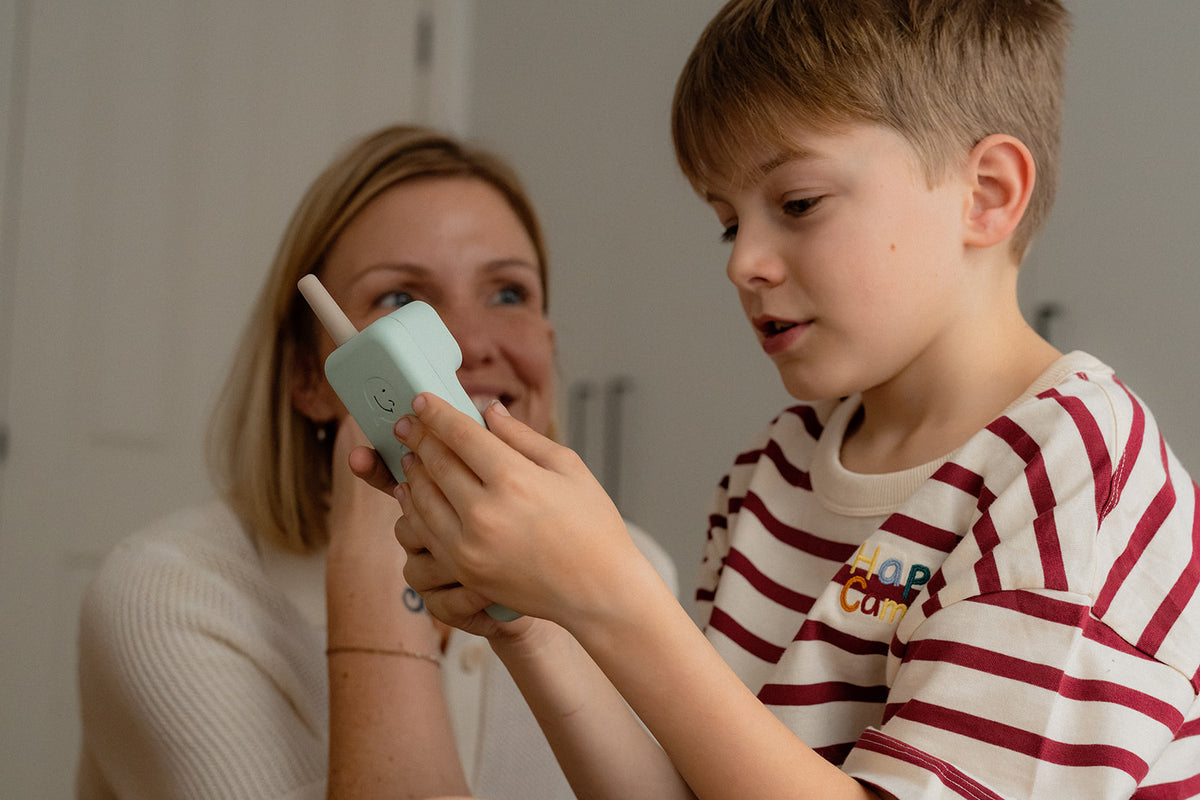
The Waffle Home is a Wi-Fi landline phone designed for children aged 5 to 12. According to the brand, it consists of a rounded base and a handset with a keypad. The child uses it to reach people their parents have approved. These are also the only people who can call them.
The device is built for talking, with voice calls and voice notes. It has no apps, no feed to scroll, no social media, and the child has no access to the internet. The Waffle Home keeps to the essentials: pick up and call a loved one.
It’s designed for families who want their child to be able to reach grandparents, a parent at work or a friend, without handing them a mobile phone just yet. The child gains a way to talk. The parent keeps control over who can be reached.
Three colours are available: mint green, graphite black and purple.

Why it exists
Waffle designs phones for children with no apps, no browser and no social media. Its devices allow calls to a list of contacts approved by parents. The Waffle Home applies this principle at home, in the form of a landline phone.
According to the brand, it gives children “a small first step towards independence”. In use, the child chooses who to call and when, within the circle set by their parents. They hold the handset, dial and lead the conversation themselves.
Waffle says it builds tools that enrich childhood, “nothing more”. The phrase sums up the approach: an object that does one thing, calling, within a framework that adults set through the Waffle Hub parental app.

What matters
The list of approved contacts. This is the heart of the system: only people chosen by parents can call. The brand states that the handset gives access to this list, next to the keypad. Contacts and settings are managed in Waffle Hub. To add an aunt or remove an old friend, parents go through the parental app, with no need to handle the handset itself.
The cordless handset. According to the brand, the handset can be used cordlessly around the house, within Wi-Fi range. The child can therefore call from their bedroom or the living room, as long as the home network reaches that far. Range depends directly on the house’s Wi-Fi.
Voice notes. Alongside voice calls, the Waffle Home handles voice notes. The brand states that these let someone leave a message when a live call isn’t possible. A grandparent who catches a child at training can leave a few words, which the child can listen to later.
Caller display. The brand states that a screen shows who’s calling. Before picking up, the child sees who it is. With a closed list of contacts, this information mainly helps them know who they’re about to speak to.
“Quiet hours”. According to the brand, parents set no-call time slots in Waffle Hub. These quiet hours can cover night-time, homework or dinner. The phone doesn’t ring during these periods, and the child can’t use it to call out either.
Emergency calls and their limits. The brand states that emergency calls remain possible, even during quiet hours. A successful emergency call triggers a notification in the parental app. In its US-based guidance, the brand specifies that no emergency call can go through if Wi-Fi, the internet or power is down. It also states there’s no fallback to a mobile network, no mobile data and no GPS. The Waffle Home therefore depends entirely on the home’s connection and electricity supply.

Day to day
Setup takes less than 5 minutes. You download Waffle Hub, pair the phone, then add contacts. The handset is ready as soon as the list contains at least one person.
According to the brand, calls run over the home’s internet connection. The phone uses built-in Wi-Fi to connect to the home network.
The box contains the Waffle Home, a charging cable, a quick start guide, access to the Waffle Hub app and a 10-day trial of Waffle Plus. The handset recharges using the supplied cable.
Two plans shape how the phone is used. The basic plan, “Home Free”, includes calls between Waffle phones, one approved contact, a Waffle phone number, the Waffle Hub app and emergency calls. The “Home Plus+” plan adds extra approved contacts and international calls. For a family with relatives abroad, this second plan is what allows those calls to go through.
Technical specifications
| Feature | Value |
|---|---|
| Category | Wi-Fi landline phone for children |
| Recommended age | 5 to 12 |
| Connection | Built-in Wi-Fi |
| Build (according to the brand) | Rounded base and handset with keypad |
| Functions | Voice calls and voice notes |
| Setup | Under 5 minutes |
| Box contents | Waffle Home, charging cable, quick start guide, Waffle Hub app, 10-day Waffle Plus trial |
| Colours | Mint green, graphite black, purple |
| Parental app | Waffle Hub |
What the brand says
Waffle states that it will never sell families’ data. It also states that it will never show adverts to children. Both commitments are aimed at parents, who entrust the app with the list of people close to their child.
According to the brand, the Waffle Home gives children a small first step towards independence. It says it builds tools that enrich childhood, nothing more.
Why it caught our eye
We like the idea of a phone that does just one thing: let a child call the people their parents have chosen, from home. We noticed the adjustable quiet hours and the voice notes for missed calls. And at Waffle, we appreciate the commitment never to sell families' data or show adverts to children.
Exactly the kind of brand we’d love to come across on O!deal one day.
SourcesWaffle (new tab) · The Gadgeteer (new tab)
Frequently asked questions
- Who is the Waffle Home for?
- The recommended age is 5 to 12. It works over built-in Wi-Fi, with no internet access for the child and no apps at all.
- Who can call the Waffle Home?
- Only people approved by a parent can call, from a contact list managed in the Waffle Hub app. Voice notes let someone leave a message when a live call isn't possible.
- Does it work without Wi-Fi?
- No, calls run over the home's internet connection and there's no fallback to a mobile network, no mobile data and no GPS. If Wi-Fi, the internet or power goes down, emergency calls aren't possible, according to the brand's US-based guidance.
- How does parental control work?
- Parents manage contacts and settings through the Waffle Hub app, including quiet hours with no calls. Setup takes under 5 minutes: download the app, pair the phone and add contacts.
Also worth reading
- O!radarmyFirst
myFirst CareSip: the connected bottle that won't unlock until your child's drink cools down
A fingerprint-locked water bottle that stays sealed until the drink has cooled and tracks hydration through an app. For children, myFirst builds it like its watches: a connected object in its own right.
- O!radarCamp Snap
Camp Snap 110D: the screen-free pocket camera in the shape of a 110 film camera
A long, slim body inherited from the 110 cameras of 1972, an 8-megapixel sensor, five filters set on the body and a microSD card already in place: the 110D never shows the photo it has just taken.
- O!radarClicks
Clicks Keyboard for iPhone 17: the physical keyboard case, slimmer and clip-on
A case that adds a real backlit keyboard below the iPhone 17: connected by USB-C, with no battery or Bluetooth, it clips on and frees up, according to the brand, the half of the screen the on-screen keyboard took.